
3 min read
Record a transaction by voice
Speak a short expense, review every field, then save.
- Step by stepMatched to the real screens
- Short readsA few minutes each
Step by step
Follow these steps
- 1
Start from Home
Tap Add Transaction by Voice. Allow the microphone if the phone asks. - 2
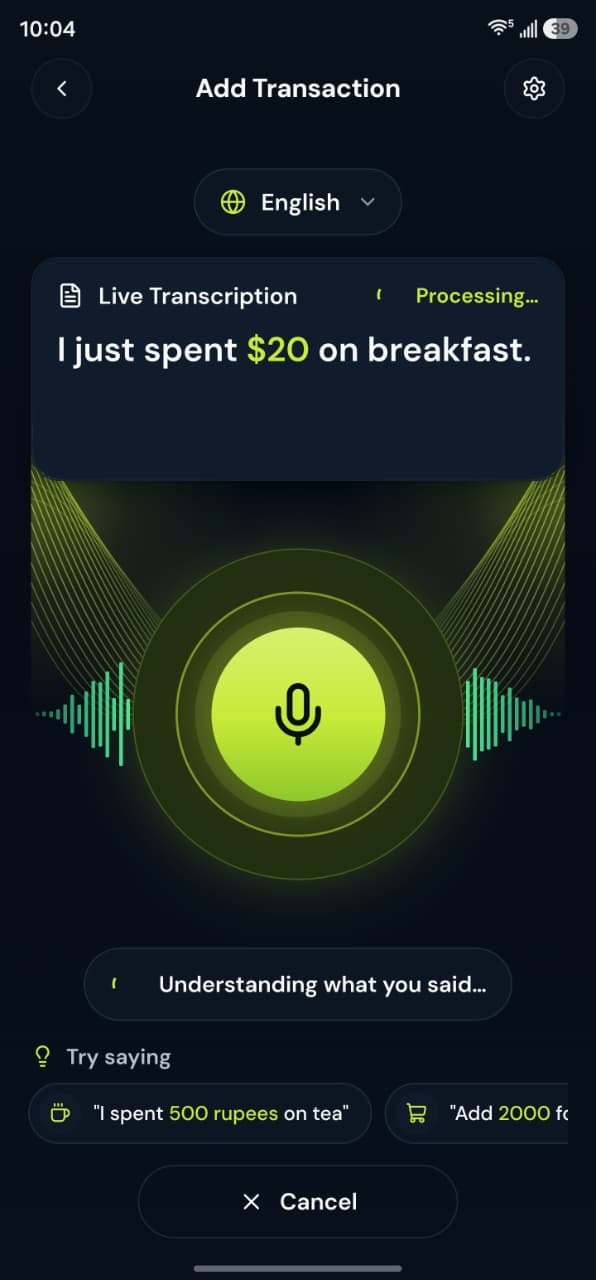
Say one transaction
Include the amount and what it was. Example: “Lunch, 450 rupees.” You can name the account or say it is for the business. - 3
Wait for the draft
The app shows that it is understanding what you said. The server does not write the ledger row at this point. - 4
Fix the fields
Check type, amount, category, account, date, and Personal or Business. Change anything that is wrong. - 5
Save
Save only when the draft matches what happened. If the recording was empty, dismiss it and try a shorter phrase or use Add Expense.
Take control today
Manage your money,
the easier way.
Speak, track, and stay in control of your personal and business finances with BoloHisab Wallet.
- Voice First
- Smart Insights
- Safe & Private
