
Workspaces
Personal and business workspaces
One account can keep a Personal workspace, a Business workspace, or both.
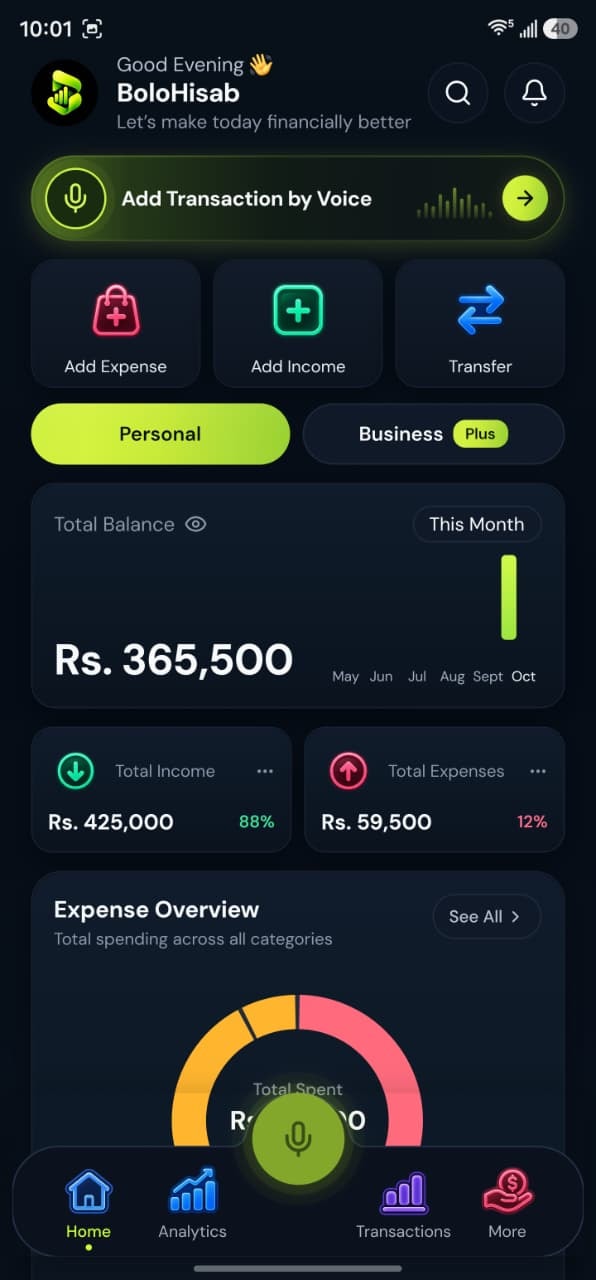
How it works
Keep household money and business money apart under one login.
1Choose during setup
Personal, Business, or Both. Both means the two spaces live in the same login.
2Switch on the home screen
The Personal and Business controls change which balance, transactions, and categories you are looking at.
3Keep categories apart
Food and rent sit with personal spending. Office supplies, client meals, marketing, and sales sit with business.
4Voice can follow the space
If you say the record is for the business, the draft can land in the Business workspace. Check the space field before you save.
Voice examples
You can speak naturally in English, Urdu or Roman Urdu. Each phrase becomes a draft you check before saving.
“Spent 1,200 on groceries.”
Draft:
- Expense
- Personal
- Groceries
- Rs. 1,200
“Bought office supplies for the business, 3,000.”
Draft:
- Expense
- Business
- Office supplies
- Rs. 3,000
“Client paid 25,000 for services.”
Draft:
- Income
- Business
- Services
- Rs. 25,000
What this feature gives you
After sign-up, account setup asks whether you want Personal, Business, or Both. You can change that workspace choice later in settings. Records, categories, budgets, and goals are stored against the workspace you pick.
Not two subscriptions
Both workspaces are part of one account. Plan limits are on the account, not a second login.
Business features flag
The plan catalog marks an extra “business features” flag on Pro. Choosing a Business workspace is part of account setup for the product and is not described here as a second app.
Questions about this feature
More answers in the help desk.
Can I use only Personal?
Yes. Choose Personal during setup, or switch the account mode later in settings.
Will business costs appear in my household total?
They stay in the Business workspace. Look at that space when you want those records.
Income and expense tracking
Record money in, money out, and transfers between your own accounts.
Learn moreBudget management
Set a spending limit for a category in the workspace you are using.
Learn moreAnalytics and reports
See income, expenses, and category totals for the workspace you are viewing. CSV export on every plan; PDF on Plus and Pro.
Learn more
